
Assistenten
Was ist ein Assistent?
Stell dir vor, du könntest einen eigenen KI-Experten für ganz spezielle Aufgaben in deinem Unternehmen erschaffen. Genau das ist ein Assistent bei Logicc! Es ist wie ein digitaler Kollege, den du genau auf die Bedürfnisse deines Teams zuschneiden kannst.
Hier sind die Kernfähigkeiten im Detail:
- Spezialisiertes Wissen: Du kannst einen Assistenten mit deinen eigenen Dokumenten "füttern". Das können zum Beispiel interne Richtlinien, Produktkataloge, rechtliche Vorlagen oder ganze Wissensdatenbanken sein. Der Assistent wird dann zum Experten für genau diese Inhalte.
- Automatisierte Aufgaben: Er kann wiederkehrende Aufgaben für dich übernehmen. Beispielsweise kann er automatisch Support-Anfragen basierend auf euren internen FAQs beantworten, lange Berichte in wenigen Sätzen zusammenfassen oder E-Mails im Stil deines Unternehmens vorformulieren.
- Team-Kollaboration: Einmal erstellt, kann ein Assistent mit dem ganzen Team geteilt werden. Das stellt sicher, dass alle auf dieselben Informationen zugreifen und zum Beispiel in der Kundenkommunikation einen einheitlichen Ton treffen.
Kurz gesagt: Ein Logicc Assistent ist dein personalisierbarer KI-Spezialist, der euer internes Wissen nutzt, um Prozesse zu beschleunigen, die Qualität zu sichern und deinem Team die Arbeit zu erleichtern.
Wie erstelle ich einen Assistenten?
Klicke auf der linken Übersichtsseite auf Assistenten, hier siehst deine Assistenten.
- Unter Deine Bibliothek findest du Assistenten, auf die nur du Zugriff hast.
- Unter Organisation findest du Assistenten, die in deiner Organisation geteilt wurden
- Unter Entdecken findest du von uns erstellte Assistenten, die du deiner Bibliothek hinzufügen kannst.

Klicke auf Assistent erstellen:
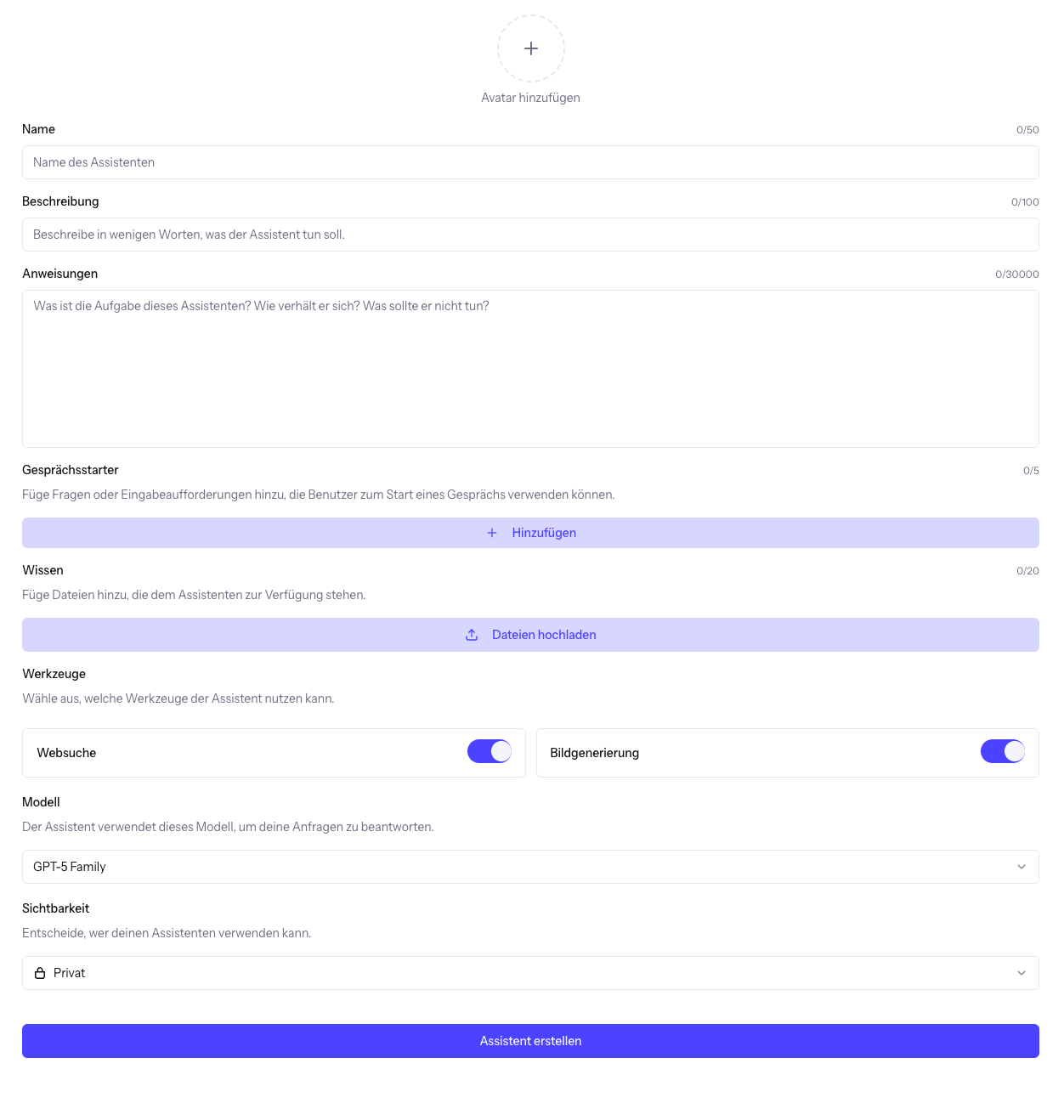
Gib deinem Assistenten einen Namen und eine Beschreibung, diese beiden Felder haben keinen Einfluss auf den Output deines Assistenten. Spannend wird es bei den Anweisungen:
- Hier hast du 30000 Zeichen um möglichst detailliert und Präzise zu beschreiben, wie du möchtest, dass dein Assistent agiert und auf deine Fragen antwortet.
- Tipp: nutze einen weiteren Logicc Tab und nutze KI um deinen Anweisungsprompt so präzise und effizient formuliert wie möglich zu machen.
Gesprächsstarter helfen Dir und den Nutzern deines Assistenten möglichst effizient und präzise in das Gespräch mit deinem Assistenten zu tauchen.
Du kannst Assistenten Hintergrundwissen in Form von PDF Dateien, Tabellen, Bildern und vielen weiteren Dateiformaten zur Verfügung stellen. Das verwendete Modell kann auf diese Dateien bei der Beantwortung deiner Anfragen zugreifen und durch den zusätzlichen Kontext bessere Antworten liefern.
Unter Werkzeuge kannst du entscheiden, ob der Assistent Websuche und Bildgenerierung aktiviert haben soll.
Wichtig im nächsten Schritt ist, das richtige Model auszuwählen, schaue dafür hier gerne vorbei.
Im letzten Schritt kannst du entscheiden, ob der Assistent nur für dich sichtbar (Privat) oder für deine ganze Organisation sichtbar sein soll.
System Prompt schreiben
Der zweite wichtige Bestandteil eines Assistenten ist der System Prompt (das Textfeld Anweisungen). Dabei handelt es sich um eine spezielle Anweisung die dem Modell implizit vor jeder Chat-Anfrage mitgeteilt wird. System Prompts dienen dazu die Antworten deines Assistenten auf einen bestimmten Bereich zu fokussieren. Das hilft dabei, die Qualität und Konsistenz der Antworten zu verbessern, unnötige Informationen auszuschließen und Ausgabeformate festzulegen. Wie man einen System Prompt selber schreibt und eine Sammlung von Vorlagen findest du in unserem Artikel Sammlung von System Prompts.
War das hilfreich?